
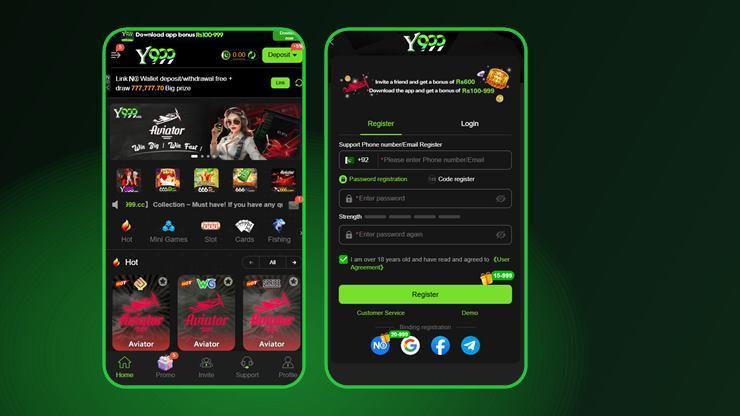
The Y999 APK is distributed by the operator, not through Google Play. Play's policies restrict real-money gambling apps in most markets, Pakistan included, so the file is downloaded directly from the operator's site and installed by hand. That is normal for this category, and it is also the step that search results try hardest to intercept.
Y999 APK Download on Android
- Open the official link in Chrome. Do not search for "y999 apk download" and pick a result — the first page of results is mirror domains.
- Tap Download. Chrome may warn that this type of file can harm your device. That notice appears for every APK.
- Allow installs from Chrome if Android asks. Settings → Apps → Special access → Install unknown apps → Chrome → Allow.
- Open the downloaded file from the notification shade or your Downloads folder.
- Tap Install, then Install anyway if Play Protect interrupts.
- Open the app and register with your +92 number or an email address.
- Claim the download reward from the banner at the top of the home screen.
The home screen banner advertises a Rs 100–999 download bonus. That is a range on a prize draw, not a fixed credit. Claim it, but do not budget around the top of the range.
What the Play Protect Warning Means
Android shows "Unsafe app blocked" or "This app wasn't scanned by Play Protect" for anything installed outside the Play Store. It is a statement about where the file came from, not an analysis finding malware.
That said, the warning is doing a real job, because it is exactly the moment a repackaged APK would get installed. The protection you need is not ignoring the dialog — it is being certain of the source before you reach it.
Y999 on iPhone and iOS
There is no App Store listing, and an Android APK cannot be installed on iOS. The route for iPhone is the browser version:
- Open the Y999 site in Safari, not Chrome — only Safari can add to the home screen.
- Tap the Share icon.
- Choose Add to Home Screen.
- Launch it from the new icon. It opens full screen, without the Safari chrome.
This is a web app, so it updates itself and needs no install permissions. Competing pages disagree sharply on iPhone support — some claim a full iOS app exists, others say no version exists at all. Neither is accurate: there is no native app, and the browser route works.
Playing Y999 on PC
The agent area carries a Switch to PC control, which indicates a desktop layout of the browser version. Open the same site in a desktop browser and sign in with the same credentials. An Android emulator is the other common route, but it adds a large download and a second trust decision for no real gain over the browser.
Why You Should Never Install a Y999 Mod APK
"Y999 mod apk", "unlimited money" and "hack version" all have search volume, and every one of those files is a trap. There is no client-side modification that creates a balance, because the balance lives on the operator's server. What a modified APK can do is read everything you type into it, including the password you also use elsewhere.
Safe
- The operator's own download link
- The browser version, no install at all
- Safari → Add to Home Screen on iPhone
Not safe
- Any "mod", "hack" or "unlimited" build
- APK aggregator and re-upload sites
- Files sent through WhatsApp or Telegram groups
When the Install Fails
| What you see | Usual cause | Fix |
|---|---|---|
| App not installed | An older build is still present | Uninstall the existing copy first, then install again |
| Parse error | The download was interrupted | Delete the file and download it again on a stable connection |
| Blocked by Play Protect | Installed outside Play | Choose "Install anyway" — only if you are certain of the source |
| No install permission | Unknown-apps access is off for your browser | Settings → Apps → Special access → Install unknown apps |
| Not enough storage | Device is full | Clear space, then retry |
| Opens then closes | Partial install or an outdated build | Reinstall from the official link |
We deliberately do not state the APK's file size, version number or minimum Android release on this page. Those change with every release, and the five highest-ranking Y999 pages state five different version numbers and four different file sizes between them. The download page itself shows the current values.
Download FAQs
Is the Y999 game on Google Play?
No. Google Play restricts real-money casino apps in most markets, so the Y999 APK is distributed from the operator's own site and installed manually on Android.
Why does my phone say the Y999 app is unsafe?
Android shows that notice for any app installed outside the Play Store. It describes the installation method rather than the contents of the file. The real risk is downloading from a mirror site instead of the official link.
How do I install Y999 on an iPhone?
Open the site in Safari, tap Share, then Add to Home Screen. That installs the browser version as a web app. There is no App Store listing and the Android APK will not run on iOS.
What size is the Y999 APK?
We do not publish a size, because it changes with each release and the figures circulating on other sites disagree with each other. The current size is shown on the operator's download page.
Do I lose my account if I reinstall the app?
No. The account lives on the operator's servers, not on your phone, so reinstalling and signing in restores the same balance and history. The one thing to keep is your login credential.