
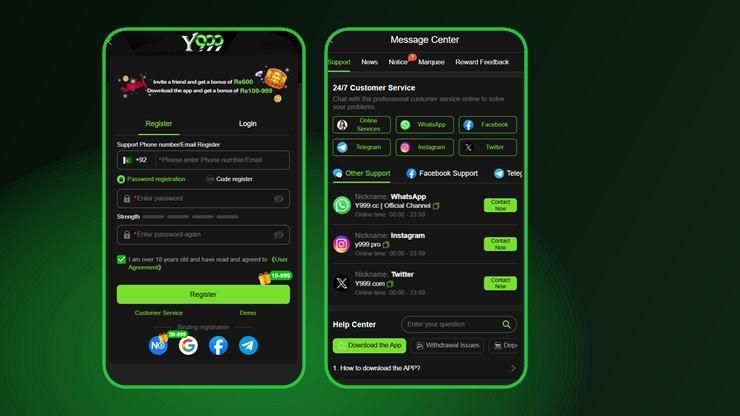
Y999 registration takes a phone number or an email address, and nothing else. There is no identity document at sign-up, no address, no card. The form pre-selects the +92 Pakistan country code, grades your password strength as you type, and will not enable the Register button until you tick the box confirming you are over 18 and accept the User Agreement.
Creating a Y999 Account
- Open the app or the site and tap Register. It sits beside a Login tab at the top of the form.
- Enter a phone number or email. The country selector already shows the Pakistan flag and +92.
- Choose Password registration or Code register. Both are offered on the same screen.
- Set and confirm a password if you took the password route. A four-segment strength meter sits under the field.
- Tick the 18+ and User Agreement box. The Register button stays inactive until you do.
- Tap Register. The button carries a 15–999 gift badge.
- Claim the download reward from the home screen banner, then link a wallet if you intend to deposit.
The register screen states "Invite a friend and get a bonus of Rs 600" and "Download the app and get a bonus of Rs 100–999". If you were given an invite link, open the app through that link so the referral is attributed — it cannot be added afterwards.
The Four Registration Routes
| Method | What you give | Worth knowing |
|---|---|---|
| Phone + password | +92 number, password | The default. Works offline once registered, so no code to wait for at every sign-in. |
| Phone + code | +92 number | No password to forget, but every login needs a delivered SMS. |
| Email + password | Email, password | Useful if you change SIM often. Keep the inbox reachable. |
| Email + code | Same trade-off as phone and code. |
If you expect to withdraw, the phone-plus-password route is the least fragile: a number tied to the account from day one is the credential a support desk can work with, and a password means you are not dependent on SMS delivery at the moment you want to cash out.
Binding Your Account
Below the Register button, four binding options appear: N0 Wallet, Google, Facebook and Telegram. The N0 Wallet icon carries its own 20–999 bonus badge, which is the app encouraging you towards the wallet it prefers for deposits and withdrawals.
Binding is a recovery route as much as a convenience. An account reachable only through an SMS code on a SIM you no longer own is an account you have effectively lost.
Y999 Login, Step by Step
- Open the app and select the Login tab rather than Register.
- Enter the same identifier you registered with — the number or the email, not whichever you prefer today.
- Enter your password, or request a code.
- Tap Login. If a code was sent, wait the full retry window before requesting another.
When Y999 Login Does Not Work
| Symptom | Likely cause | What to do |
|---|---|---|
| Account not found | Registered by email, signing in by phone | Use the identifier you actually registered with |
| Wrong country code | 0 kept in front of the number after +92 | Drop the leading zero: +92 3XX, not +92 03XX |
| Code never arrives | SMS filtering or poor signal | Wait the full retry window, check blocked messages, then try email |
| Password rejected | Password set on a different account | Use recovery rather than guessing — repeated failures can lock the account |
| App closes at login | Outdated build | Reinstall the current APK from the official link |
| Works in browser, not app | Stale app cache | Clear the app's cache, or reinstall |
A failed Y999 login is almost never a ban. If none of the above resolves it, the app has a staffed support desk — Online Services, WhatsApp, Facebook, Telegram, Instagram and X, listed as available 00:00 to 23:59. Open the Message Centre from the Support tab.
Keeping the Account Secure
- Use a password you use nowhere else. A wallet balance is a target, and reused passwords are how accounts are taken.
- Bind a second method so losing a SIM does not lose the account.
- Never install a modified build. A repackaged APK reads what you type into it, password included.
- Treat any "agent" who asks for your password as a thief. No legitimate support desk needs it.
- Check the number on the account before you request a withdrawal, not after.
Login FAQs
Do I need documents to register on Y999?
Not to create the account. Registration needs only a phone number or an email address plus a password or a one-time code. Verification requirements for withdrawals are set inside the app and are not published on the registration screen.
Can I change the phone number on my Y999 account?
That is a support request rather than a self-service setting. Contact the desk through the Message Centre before you lose access to the old number, because proving ownership afterwards is much harder.
I forgot my Y999 password. What now?
Use the code-based login route with the same number or email you registered with, then reset the password from inside the account. Avoid repeated wrong attempts, which can trigger a temporary lock.
Why does Y999 say my account does not exist?
Almost always because the identifier does not match the one used at registration — an email account being signed into by phone, or a number entered with a leading zero after the +92 prefix.
Is one Y999 account per person?
Operators in this category generally enforce one account per person and per device, and treat multiple accounts as grounds to void bonuses. Creating a second account to claim the welcome rewards again is the usual way people lose a balance.